Monday, 13 June 2022

All the Things you need to Know As A 3d Printer Beginner

Models and prototypes for the industry have been transformed thanks to 3D printing. When compared to traditional approaches, rapid prototyping enables the production of goods in hours or days rather than weeks. Almost anything you can imagine can be produced with 3D printing.

A variety of applications can be created with 3D printing. New materials and applications are found every day, and as a result, more businesses are turning to this technology for faster prototyping and manufacturing. So what exactly should you be familiar with when starting 3d printing?

1.      The appropriate material

The more you 3D print, the simpler it will be to select the appropriate 3D printing filament for your project. Because there isn't a one-size-fits-all filament that will work for everything, you'll have to experiment to see what works best. For instance, PLA is one of the easiest materials to 3D print, if not the easiest. We also have the PETG filament, which has some amazing features such as:

Heat-resistant and long-lasting, with excellent stiffness and flexibility

  •  Chemical-resistant, tolerant of a variety of solvents and detergents
  •  Low warping, easy to print with  1.75 mm (0.03 mm) diameter with high dimensional accuracy
  • Wide range of applications; works with most 3D printers

2.      Replacing a Nozzle

Changing nozzles is a regular part of maintenance that can improve your printing quality simply by replacing a worn-out nozzle. You might also modify the material of your nozzles to be able to print with various filaments at a quicker rate. Knowing how to replace a 3D printer's nozzle is a vital item to have in your toolkit.

Due to the compatibility of our various 3d printing filaments and bed surface materials, bed stickiness plays a big role in the success of 3D prints. Each build surface has its own set of advantages, such as maximal printing temperatures, compatible materials, and ease of removal for final 3D prints.

Have the Right Equipment

Don't forget to think about your actual toolkit while you construct your conceptual 3D printing toolbox. The more you 3D print, the more you'll figure out which tools are essential to you, which ones don't function as well as you expected, and where your toolkit is lacking.

All of these suggestions will assist and guide you on your 3D printing adventure. Remember that you will not improve overnight. It is a continuous process.

Get Snapmaker 2.0 enclosure from our online store. It has amazing features that will elevate your 3d printing experience. The all-around protection for your creation will offer you an extra layer of safety during the making process. We also have the best starter 3d printer for any beginners interested in the 3d printing journey.

Wednesday, 1 June 2022

Important Things you should know about the 3d Printer Enclosure

A 3d printer enclosure is a cage or crate that encloses the printer to keep the temperature within the printer constant. The features of our 3d printer enclosure are listed below. We'll also look into some of the features mentioned.

·         Laser reduction

·         Noise reduction

·         Smell & fume shielding

·         Dust shielding

·         Good lighting

·         Stable environment for sensitive filaments

·         Safe environment for kids and pets

Importance of 3d printer enclosure

  • Heat loss is reduced.

3d printers require a specific temperature to be attained and maintained. When heat is lost, the heating element must compensate, meaning more electricity is required. If you can cut down on heat loss, you can save a huge amount of money on power. Our 3d printer enclosure can help with this. The enclosure makes it simple to measure and manage the inside temperature. The cage keeps the air within from escaping. It keeps the air warm, lowering your utility bill.

  • Noise reduction

Unwanted noise is common with 3D printers. Some printers are quite loud, to the point that you and others may be distracted. Though it is not the primary component in noise reduction, an enclosure can limit noise in locations where it is a concern. Our 3d printer enclosure is completely enclosed, reducing noise levels up to 10 dB (A), ideal if you have one in your workplace or bedroom where you need maximum silence.

  • Higher print quality

The nozzle temperature should be constant with the needed temperature for high-quality printing. This is accomplished by retaining hot air within the cabinet and maintaining the temperature through sufficient ventilation.

  • Defense against dust particles

Our 3d printer enclosure also safeguards the printer from the environment's dust and other dangerous air particles. Because dust particles might block the nozzle, printers with tiny nozzles, in particular, can be severely harmed.

Must-have features for a good 3d printer enclosure

  • Enough Room

A decent 3D printer enclosure should be large enough to accommodate all of the moving elements throughout the printing process.

  • Safety features

One of the primary functions of our 3d printer enclosure is to make your working environment safer. Physical safety, such as not touching moving or heated parts, air filtering, and fire safety are all examples.

  • Light

3D prints can be a lot of fun to watch as they advance, so having decent lighting for the enclosure is a terrific thing to have. Our 3d printer enclosure has built-in LED strips. Create as you like, whether it's day or night.

You can also get high-quality 3d printer filament at budget-friendly prices at our online store. Feel free to contact us for inquiries.

Wednesday, 27 April 2022

What You Should Know About 3d Printing for Beginners


There are things about 3d printing that we ought to know before we get started. Can 3d printing be used for practical means? The simple answer to this is yes. If you have never heard about 3d printers, then it's time to meet the Snapmaker. These printers are more than just ornamental. They are gadgets that have revolutionized 3d printing. 3d printing can be used for your day-to-day activities to create a wide range of items that make life easier. 3d printing in healthcare has made it possible to make medical prosthetics. This technology is generally new in the market. It made its way to the modern times from the 1950s. 3d printing, unlike the usual type of printing, involves the making of 3-dimensional models. Below is what you should know about 3dprinting for beginners.


How long does it take to print a model using a 3d printer?

It generally takes more time to print a 3d object than it does the usual printing. The old models 3d printers take longer than the newer ones.

How much does it cost to buy a 3d printer?

Depending on what you would like to go for, a 3d printer is generally affordable. You only have to make sure you choose one worth every penny. You can get amazing deals when you visit https://shop.snapmaker.com/. With less than 1000 dollars, you can get a quality 3d printer.

How to take care of a 3d printer

Taking care of a 3d printer involves a lot of things. It involves lubrication, keeping it clean, and replacing the accessories. You have to keep yourself safe when handling it. Always ensure to read the safety notes on the machine. Only do this when the machine is turned off. In addition, you can use safety gloves when handling the equipment.

Who can operate the 3d printers?

The modern-day 3d printers do not need professional training to handle. Get one with easy-to-follow user manuals and one equipped with all accessories needed. You can always contact your store for further directions on usage.

How to assemble the printer         

Your printer is most probably going to come disassembled. Ensure you protect yourself by assembling the printer when it is off the power. Assembling it is a one-person job, especially with easy-to-follow instructions.

Where you can get the best deals

Shopping for 3d printers is hard, and it may be harder, especially for beginners. You can visit our website for the best deals on 3d printers and related items.

The future of 3d printing is great. Some estimate that nearly all households will have a 3dprinter in the future. If you have already purchased a 3d printer and keep failing at it, don't give up. If you still don't get it right after several trials, you can contact your supplier to get further insight. I hope this article has shed some light on those who are beginners.


Is Laser Engraving a Profitable Business?

The majority are skeptical about opening any type of business. This mistrust is great because it gives you the morale to research more about the business before investing your cash into it. However, too much of it is not good because it may hold you back. Have you ever thought about starting an engraving business? The truth is, laser engraving is a whole career on its own. Below is all you need to know about the business.

How much capital is required?

Many are fixed on what amount of capital will be adequate to start such a business. This majorly depends on where you want to set it up. The cost of starting this business may vary from place to place. You may also have to factor in other things like government licensing and the number of employees you would require. It also depends on where you would love to set it up. With the advancement of social media, you can decide to set it up at home and advertise it on social media to save on costs.

What resources are needed?

Aside from the typical things you need to start any business, you will need a laser engraver. You might need about 1000 dollars to purchase a quality laser engraver. You can check out our website for the best 3 in 1 3d printer.


Safety      

Working with lasers always requires safety. You have to adopt the safety-first strategy for both your employees and yourself. You can start with safety training. Ensure this is implemented by buying safety equipment and the best laser engraver in the market. This is one way to maximize your profit because you don't want to compromise your health or that of your employees.


How much should you charge?

The answer to this is quite relative. It all depends on the magnitude of the job done per customer, or you can charge according to the amount of time. You should typically charge between 9 to 50 dollars, which is fair enough.

There are 3 actions you can take to ensure your laser engraving business is on top of the game.

·    Generate reach to build brand awareness

·    Reassure customers by providing quality service and meeting the client's deadlines

·    Maximize the resources that you have at the time and ensure that you are using the best 3d printer and laserengraver

I hope this article gives you enough insight to kick start your business.

4 Safety Tips for Handling a Snap Maker 3 In 1 3D Printer

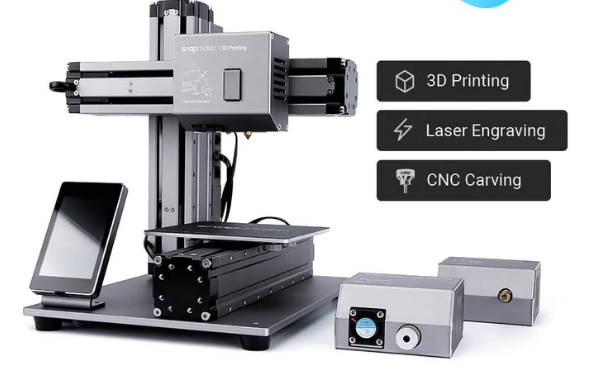
 The snap maker 3in 1 3D printer came into existence about 3 years ago. A whole new experience was introduced to the work of homemakers who use detachable modules to covert between a 3D printer, a CNC carver, and a laser engraver. Moreover, it comes at a suitable price that gives you value to the last coin. If you're looking for a 3D printer that will turn your ideas into reality, then this is the machine for you. Below are a few tips that will help you make good use of your printer in the best way possible.

Make sure you go through the user manual. As obvious as it sounds, several people ignore going through manuals for various reasons. However, for a complex commodity, it is essential to go through the manual as many times as possible to understand how to use the product. Failure to which may lead to personal injury or damage to the machine, which eventually leads to the production of undesired results. When you carefully read through the manual, you will note that the snapmaker enclosure is a vital element for safety.


·    Use laser safety goggles.

The laser module is a critical part of this printer. Therefore, users should exercise a lot of caution and operate it with sufficient knowledge. Laser safety goggles will help protect your eyes from direct beams that may injure your eyesight. Be sure to use functional goggles that will give full protection to your eyes. When you notice any damage to your goggles, ensure that you replace them immediately as they may cause harm to your eyes. It's also wise to apply the right criteria when cleaning your goggles. To avoid scrapping them, use PH-neutral detergent and water.

·    Use a safety mask.

When operating the CNC module, it is crucial to wear a safety mask. Moreover, you should not forget to use CNC safety goggles. It's also important to note that one should not hold the workpiece with bare hands. The CNC cuttings contain a discharge filled with chemicals that may irritate your skin. Additional safety precautions should be taken. Wearing an N-95 mask prevents exposure to such chemicals.


·    Avoid exposing the machine to humid conditions.

Humid temperatures can affect your machine's life span and its overall performance. Having made such a huge investment, it's essential to learn how to best take care of it. Curbing cold weather is one way to ensure better performance. One way to go about this is to store your supplies at room temperature.

I guarantee that the above tips will make you get the most out of your 3d printer.

Monday, 25 April 2022

3D Printing, What are the Benefits?

3D printing has been around for a while, but it has only recently become more affordable and accessible to the public.

The Pros:

  • 3D printing allows people to design their objects.
  • It is environmentally friendly.
  • It can be used for prototyping designs before they are made into a physical object.
  • The Cons:
  • 3D printers can be expensive and require a lot of upkeep.
  • 3D printers are not as accurate as traditional manufacturing processes, which means that the final product might not look like what was designed.

3D Printing is a technology that has the potential to change the way we live and work in many ways.

With 3D printing, it is possible to create prototypes and products in a much quicker time than traditional manufacturing methods. This makes it an ideal solution for companies who are constantly struggling with deadlines and need to produce new products on demand.

3D printing also provides us with more freedom when designing our products. We can use CAD software and 3D printers to make whatever we want, whenever we want them.

The Snapmaker 3D printer was designed with the average consumer in mind, and it has all of the features you would expect from a high-quality printer. It also has some features that other printers don't have. The Snapmaker 3D Printer can print objects up to 12 inches tall, perfect for printing toys and small figurines.

The Snapmaker 3D Printer can also print in full color, which means you can print colorful figurines or other objects. As a result, you don't have to worry about your kids playing with their toys anymore because they will be as safe.

The Snapmaker is a revolutionary 3D printer used for home and commercial applications. It can print in a wide range of materials and can be used for various purposes such as education, engineering, architecture, and many more.

The future of the 3D printing industry is bright because it will continue to evolve in the coming years. This will affect how we consume goods and how we create them.

Why You Need a Snapmaker Enclosure for Your 3D Printer

Snapmaker Enclosure is a 3D printer enclosure designed to protect your 3D printer from dust, dirt, and other elements. It also has an integrated cooling system that prevents the heat from building up inside the enclosure and damaging your printer.

The Snapmaker Enclosure is made of high-quality aluminum, making it durable and lightweight. It also has a sleek design which will look good in any office. 3D printers are expensive machines that need a lot of space. Therefore, when you buy a 3D printer, you will also need to buy an enclosure.


3D printers are becoming more popular by the day. These printers can be an excellent asset for your business, but they can also create a lot of mess. A 3D printer enclosure will help you contain the mess and keep it away from your workspace. A 3D printer enclosure is an excellent investment for any small business owner or maker who wants to have their 3D printer in the office.

Enclosures are necessary because they protect the printer from the environment and keep it safe. An enclosure is just one of the many things you will need to purchase when buying a 3D printer. 3D printing is a great way to make prototypes and small batches of products, but it's not always safe.

You need an enclosure to print with a 3D printer to get the best results. With an enclosure, you have the protection of your prints from any possible dust particles that could be floating in the air and any other fumes or chemicals that might be present in your workspace.

Enclosures are also crucial for keeping children away from the printer while it's in use. The Snapmaker Enclosure is a great way to protect your printer from the environment. It also provides peace of mind by keeping your printer safe and out of the way.

The Snapmaker Enclosure is made of high-quality materials that are durable and can withstand most conditions. The enclosure is also easy to assemble, making it accessible for everyone. An enclosure will shield your printer from damage and keep it out of harm's way. It will also give you peace of mind because you won't have to worry about your printer being in an unsafe place where it can be damaged or stolen.

Get Ready to Unleash Your Side This Easter with the Snapmaker 3D Printers

Easter is a time of celebration new beginnings and limitless imagination. Embrace the holiday spirit by incorporating the Snapmaker 3D print...